
KnoxxPay
Features Business About Help Center Request a feature
Get the app
  1. Help Center
  2. Crypto
  3. How to get a crypto statement

Crypto

  • How to buy crypto on KnoxxPay
  • How to receive crypto into KnoxxPay
  • How to send crypto to another wallet
  • How to sell crypto for Naira
  • How to get a crypto statement

Still need help?

Our team replies in the app and by email.

Chat with us

How to get a crypto statement

Updated 23 October 2026 · 1 min read

Short answer

Open your crypto wallet, tap Statement, pick the asset and a start and end date, then tap Request statement. It is sent to your email in a few minutes.

Video guide coming soonFollow the steps below for now.

Step by step

  1. Step 1

    Request a statement

    Choose the asset and dates, then tap Request statement.
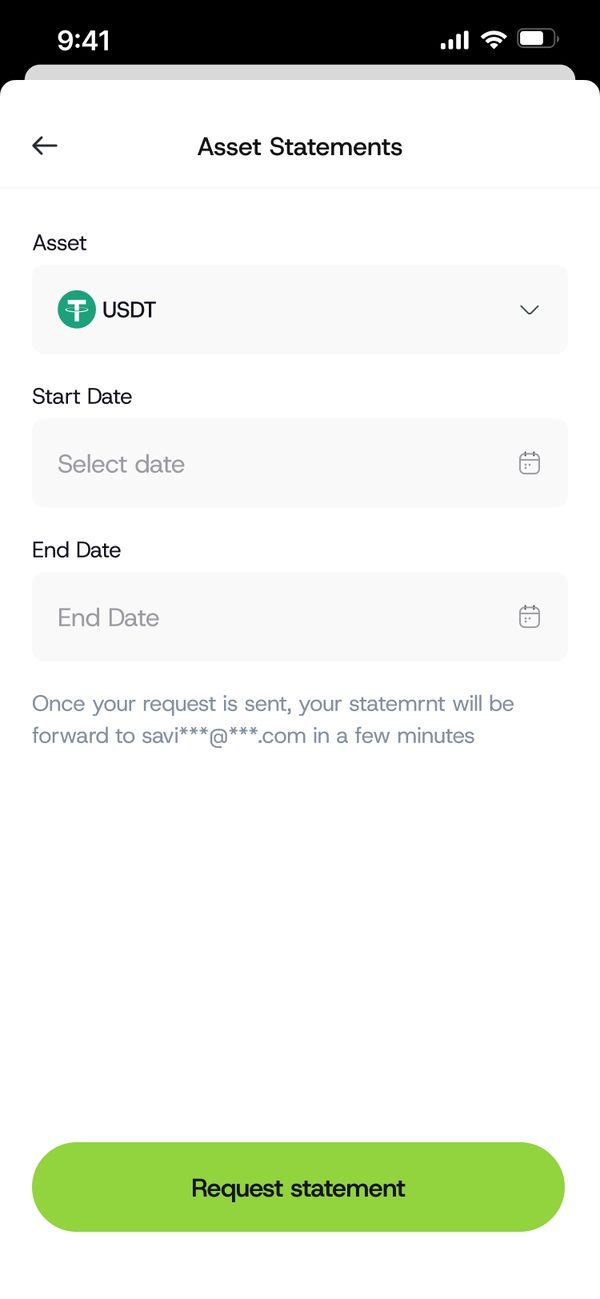
    Request a statement

Was this article helpful?

Related questions

  • How to buy crypto on KnoxxPayCrypto · 1 min read
  • How to receive crypto into KnoxxPayCrypto · 1 min read
  • How to send crypto to another walletCrypto · 1 min read
  • How to sell crypto for NairaCrypto · 1 min read

Still need help?

Chat with us. A real person will pick it up.

Chat with us
KnoxxPay

KnoxxPay is a product of KnoxPaee Technologies Limited (CAC RC 8773419). 3 Tunde Joda Street, Off White Sand School, Lekki, Lagos.

support@knoxxpay.com · +234 916 080 5210

Features

Sell gift cards Buy gift cards Pay bills USD account Naira wallet Crypto

Company

About Business Careers Contact us

Help and legal

Help Center Request a feature FAQs Customer support Terms of use Privacy policy Delete my account

© 2026 KnoxxPay. Crypto prices can go up and down. Betting is for 18+ only. Please play responsibly.

Designed and developed by AlphaMax Digital Services

Scroll to top